90POE · Enterprise fintech · B2B payments

Leading design on a 0-to-1 finance MVP that invoiced $500M in five months

I led design 0 to 1 on B2B invoicing and payments for enterprise finance teams. Testing with 32 users changed leadership's plan before launch

Read
The invoice view: approval and payment history in the Progress and Notes panel, beside the generated invoice document.
One invoice's approval history in one panel, beside the generated PDF
Owned

Led B2B invoicing and payments 0 to 1, from discovery to after launch. Shaped the product roadmap with the Head of Product and defined the MVP with the team

$500Minvoiced in the first five months after launch
32users in interviews and A/B tests
100%of invoices sent on time after launch
ProblemThe first version came before any user testing. The old invoicing system looked dated and sat apart from the platform. Users checked each invoice two or three times
ConstraintsThe MVP had a tight deadline, and access to users was limited. B2B and B2B2C payments have their own edge cases. The product had to work across a cloud platform and two apps
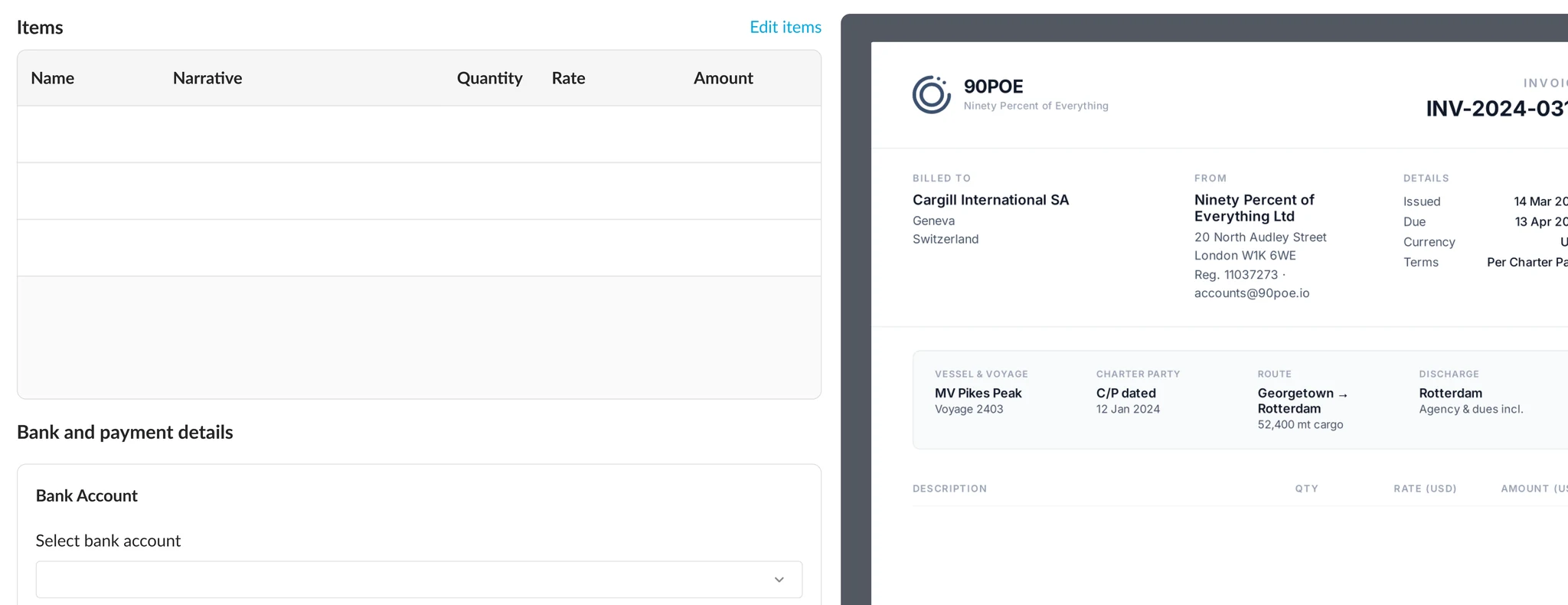
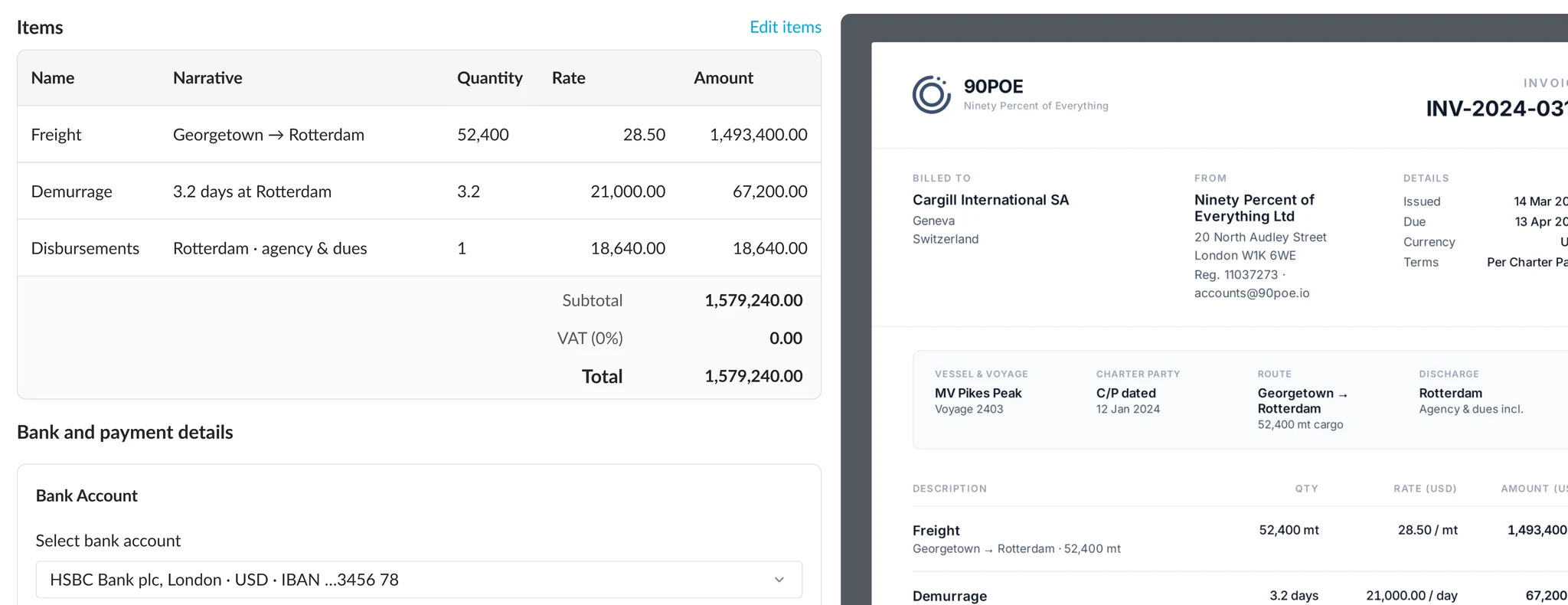
The Create invoice screen with the freight, demurrage and commission lines filled in, and the final freight invoice beside it updated to match
Drag to compare the invoice screen before and after the form is filled
DecisionLeadership planned to send each invoice as a share link. I tested it against a status dashboard with users and kept making the case with the data until leadership chose the dashboard. I also got a PDF preview into the MVP and designed a three-tier permission model, so a director signs off each invoice
The invoices tab for voyage V0002403. Totals for all invoices, awaiting approval, part paid, paid, reversed and overdue sit above a list of eight invoices, each with a status, customer, dates and balance.
The status dashboard that leadership chose over the share link
OutcomeThe old and new systems ran side by side before switch-over. Every invoice matched. Three other teams adopted the document pattern

Discovery found where invoicing slowed finance teams down

The first version came before any user testing, and access to users was limited. I led design through discovery, testing and launch. I started with the evidence I could reach: heuristic reviews, heat maps and a competitor review. The old system looked dated and sat apart from the platform. Users checked each invoice two or three times. With finance experts, I mapped the jobs to be done for the three roles in the approval chain.

One payment had seven readers: the transformation team, operators, the dry and wet teams, accountants, approvers and the client's customers. I built the information architecture around the Voyage, Fixture and COA Manager, so each cost sits on the voyage it belongs to.
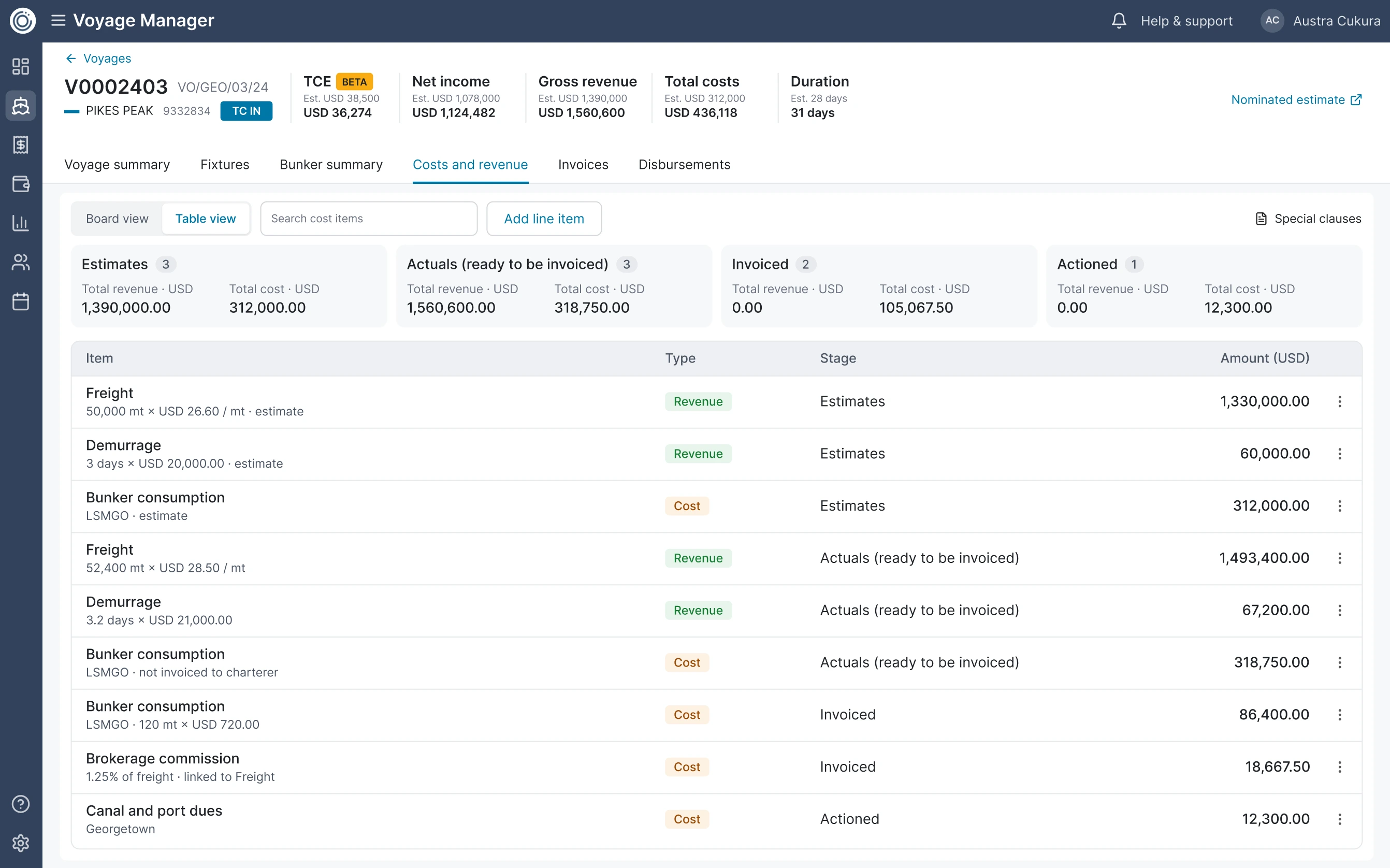
The costs and revenue table view for voyage V0002403. Totals for estimates, actuals, invoiced and actioned sit above a table of freight, demurrage, bunker, brokerage and port dues, each with its type, stage and amount.
The table view lists every cost on the voyage with its type, stage and amount
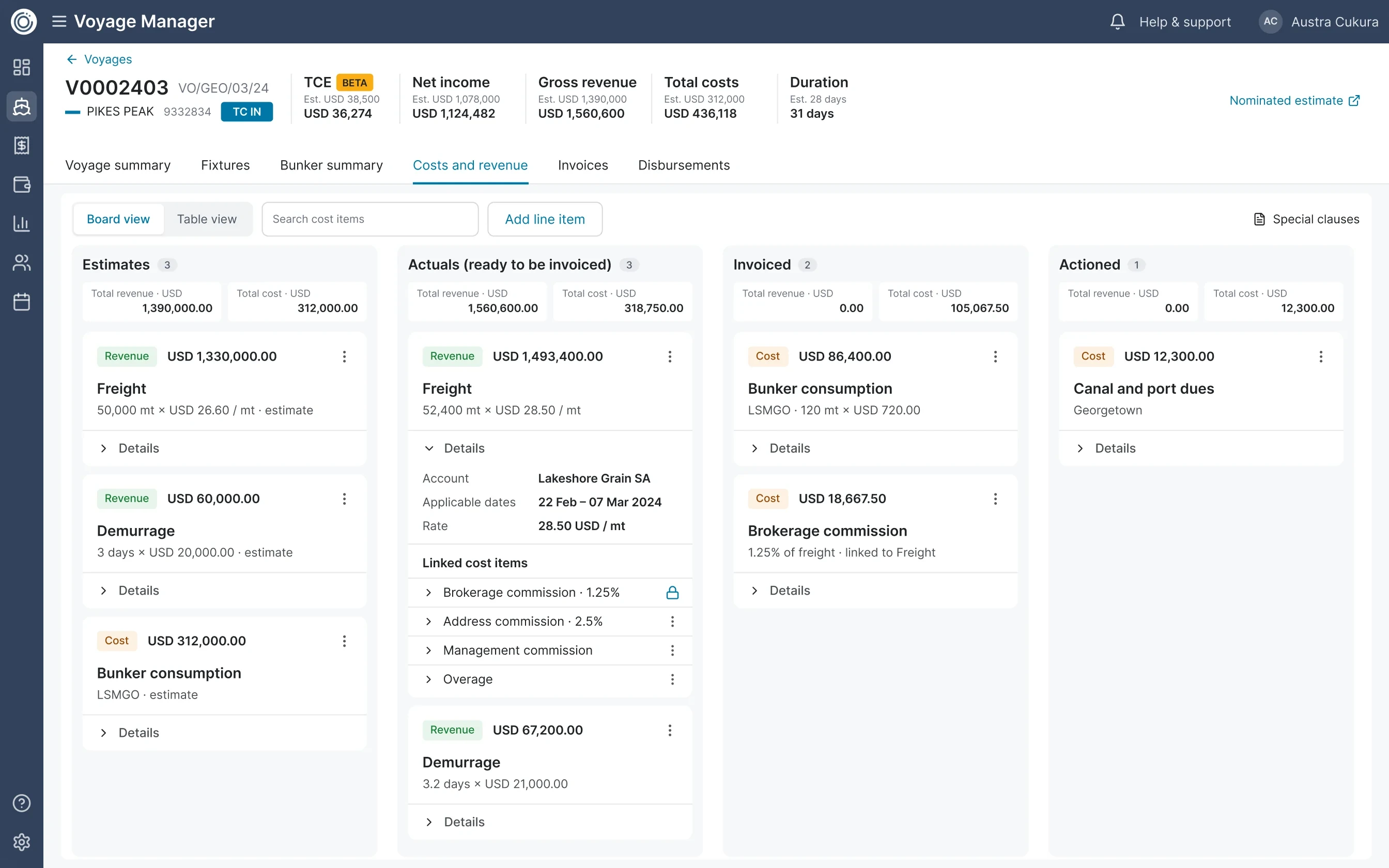
The Voyage Manager costs and revenue board for voyage V0002403. Four columns: Estimates, Actuals ready to be invoiced, Invoiced and Actioned. Freight, demurrage, bunker and commission items sit as cards.
Each cost moves on one board, from estimate to actuals, invoiced and actioned

A/B testing with 32 users built the case for a status dashboard over a share link

Leadership wanted to stop at invoice generation and send each invoice as a link by Slack, Teams or email. It was quick to build. I challenged the plan on data safety, privacy and how a team would track many links a day. I tested both versions with 32 users in interviews and A/B tests. Most chose the dashboard. I took the data to leadership and kept making the case until they dropped the link. The customer backed it too. The dashboard shows what waits for approval and what is approved. It took little extra build time.

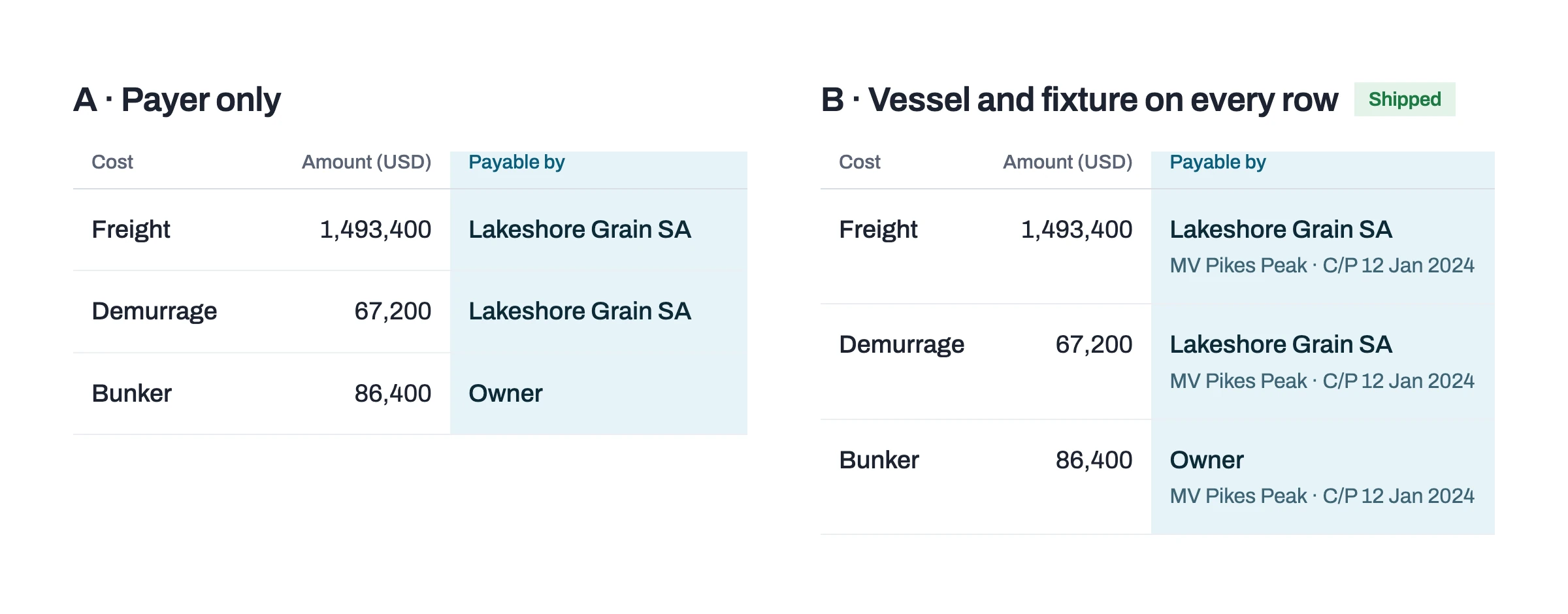
A second test asked who gets invoiced for each cost. Version A used multi-fixture selection. Version B put the vessel and fixture on every row, and B shipped. Finance could see who gets invoiced without opening the fixture.
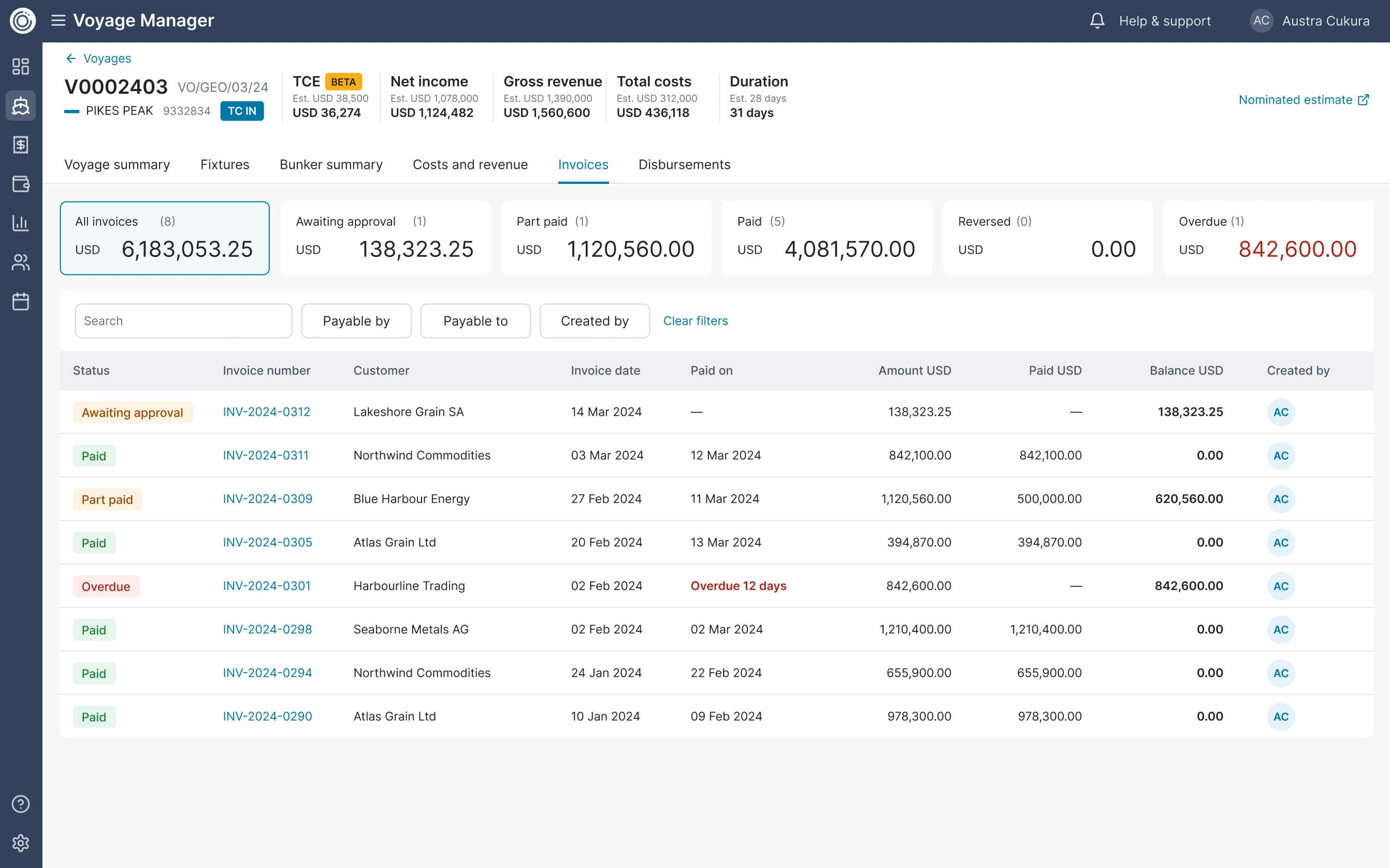
The invoices tab for voyage V0002403. Totals for all invoices, awaiting approval, part paid, paid, reversed and overdue sit above a list of eight invoices, each with a status, customer, dates and balance.
The status dashboard that shipped: what waits for approval, what is paid and what is overdue
A/B test, who gets invoiced for each cost. A shows the payer only. B, shipped, shows the vessel and fixture date under the payer on every row.
Version B shipped: the vessel and fixture sit on every cost row

Progress and Notes gives each invoice an audit trail beside the document

I designed Progress and Notes as a panel beside each invoice. It lists every approval step and comment in the order the team works, from draft to payment recorded.
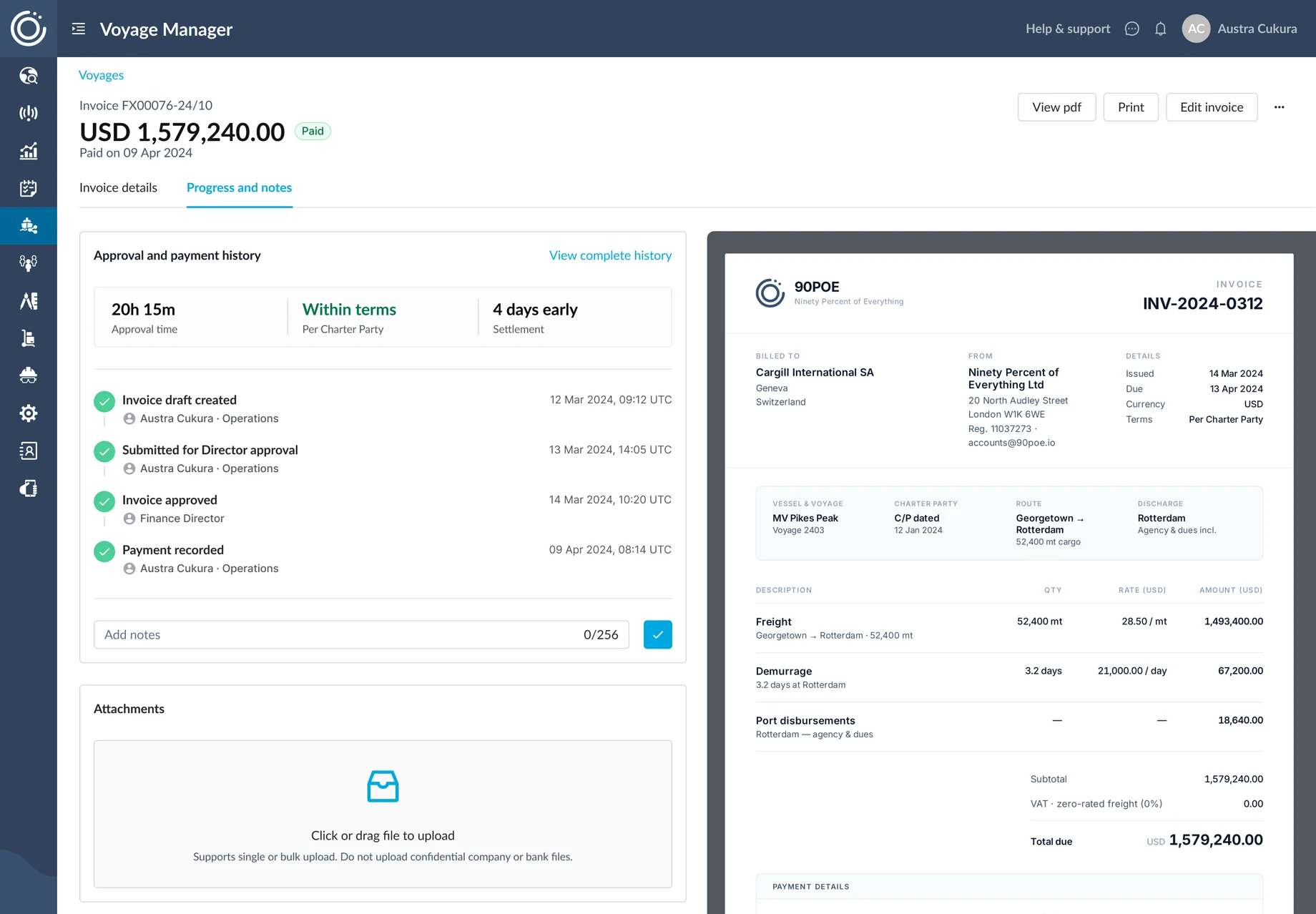
The invoice view: approval and payment history in one panel (draft created, submitted, approved, payment recorded) beside the generated invoice document.
Progress and Notes: every step from draft to payment recorded, beside the generated invoice

I designed a PDF preview so teams could see each invoice before it left

The old system gave teams no way to see an invoice before it went to the customer. I designed a PDF preview that updates live beside the form and proposed it for the MVP. Engineering estimated it beyond the deadline. I asked them what stood in the way. The backend work was new to the team. We added sprint time for a spike, and the preview shipped inside the MVP. Each customer got their own branding in a layout they knew, with the new features built in. Testing also led me to redesign a four-level sticky footer into one line of buttons.
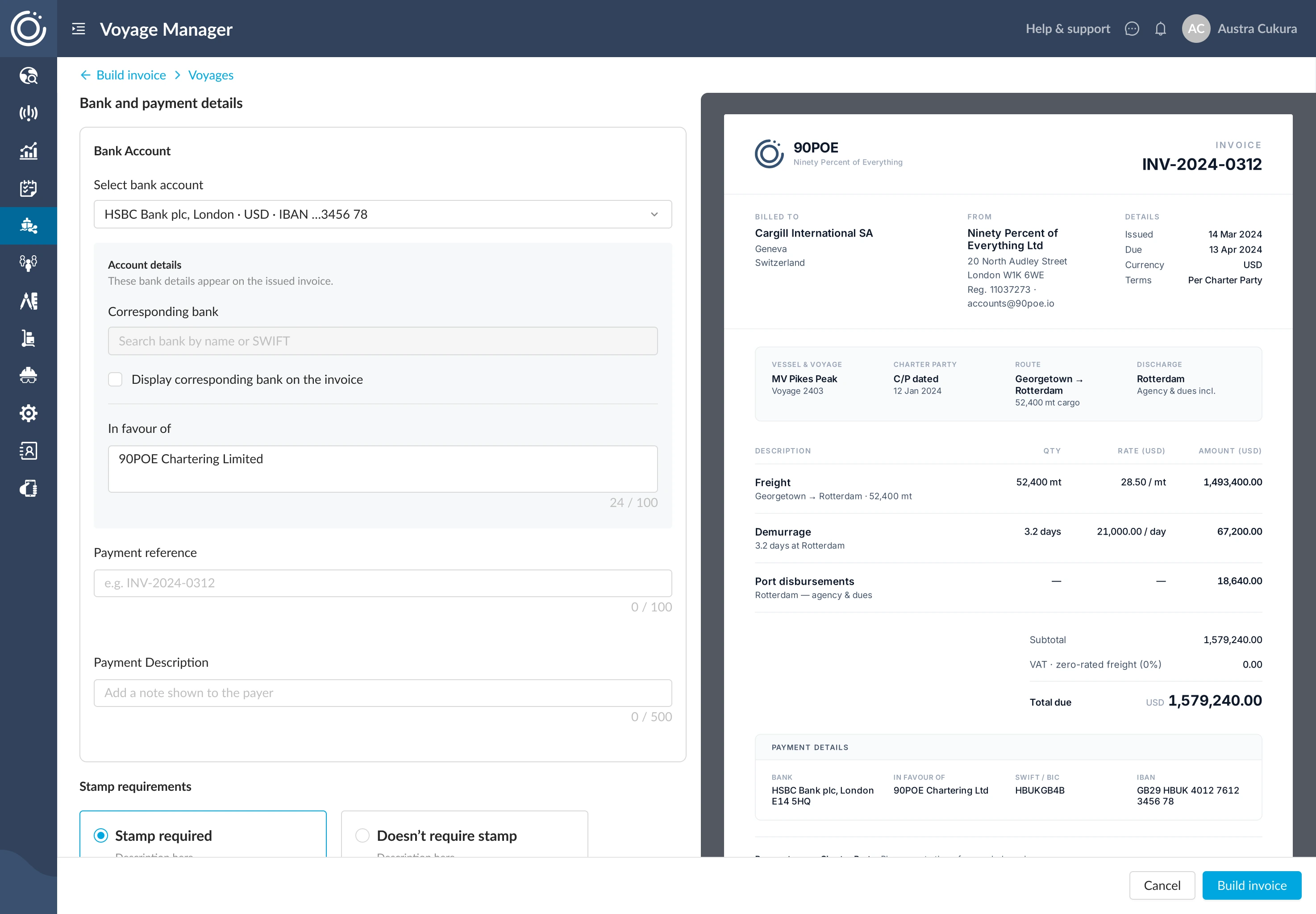
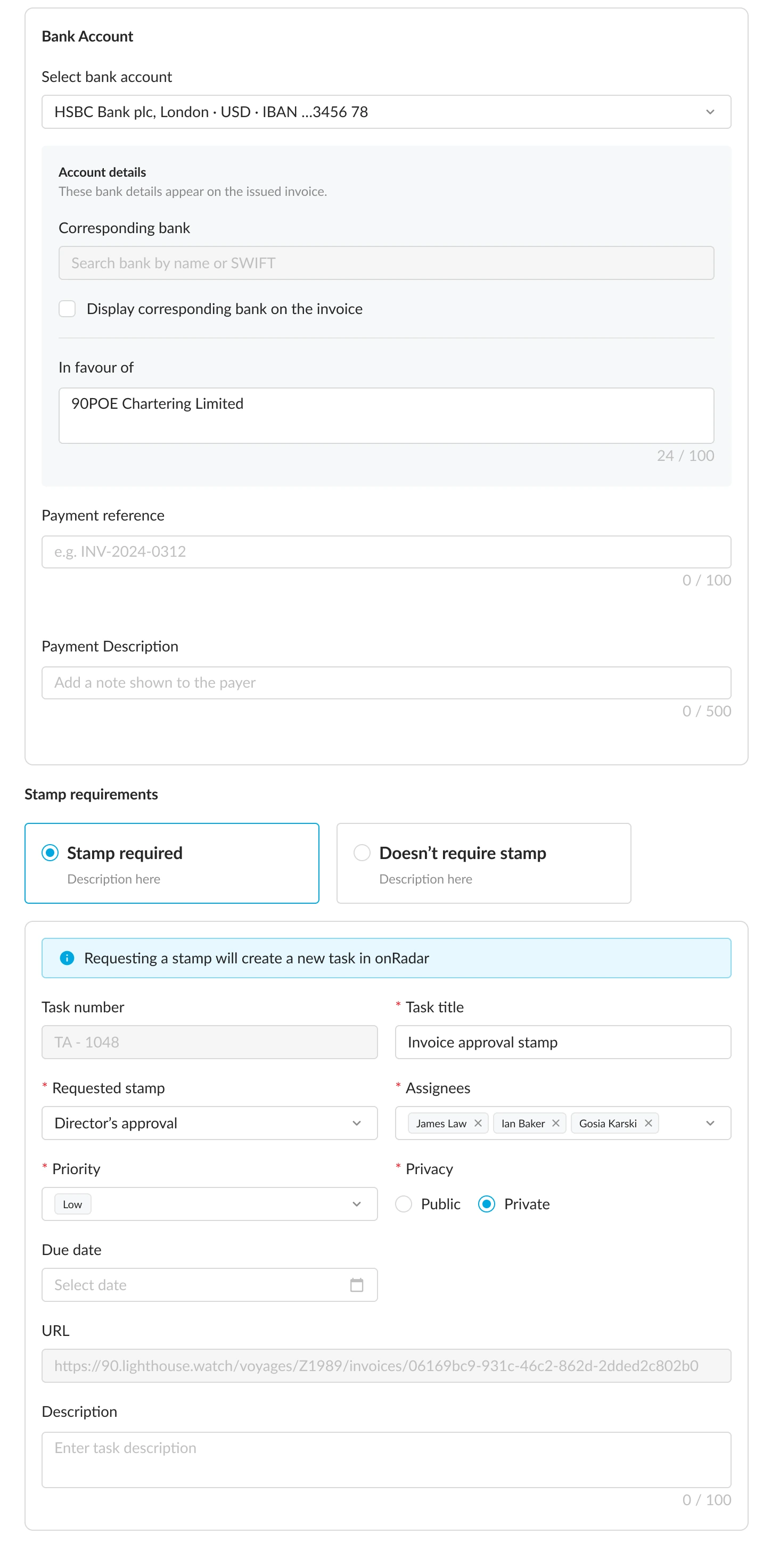
The bank and payment form, with bank details and the payment section
The bank and payment form, with the PDF preview beside it

A three-tier permission model sets who approves each invoice

Two people check and approve each invoice before a director signs it off. The old system handled permissions well, and the new one had to match it. I built a three-tier permission model. Each person sees and acts on only what their level allows. The dashboard status updates by itself at each step.
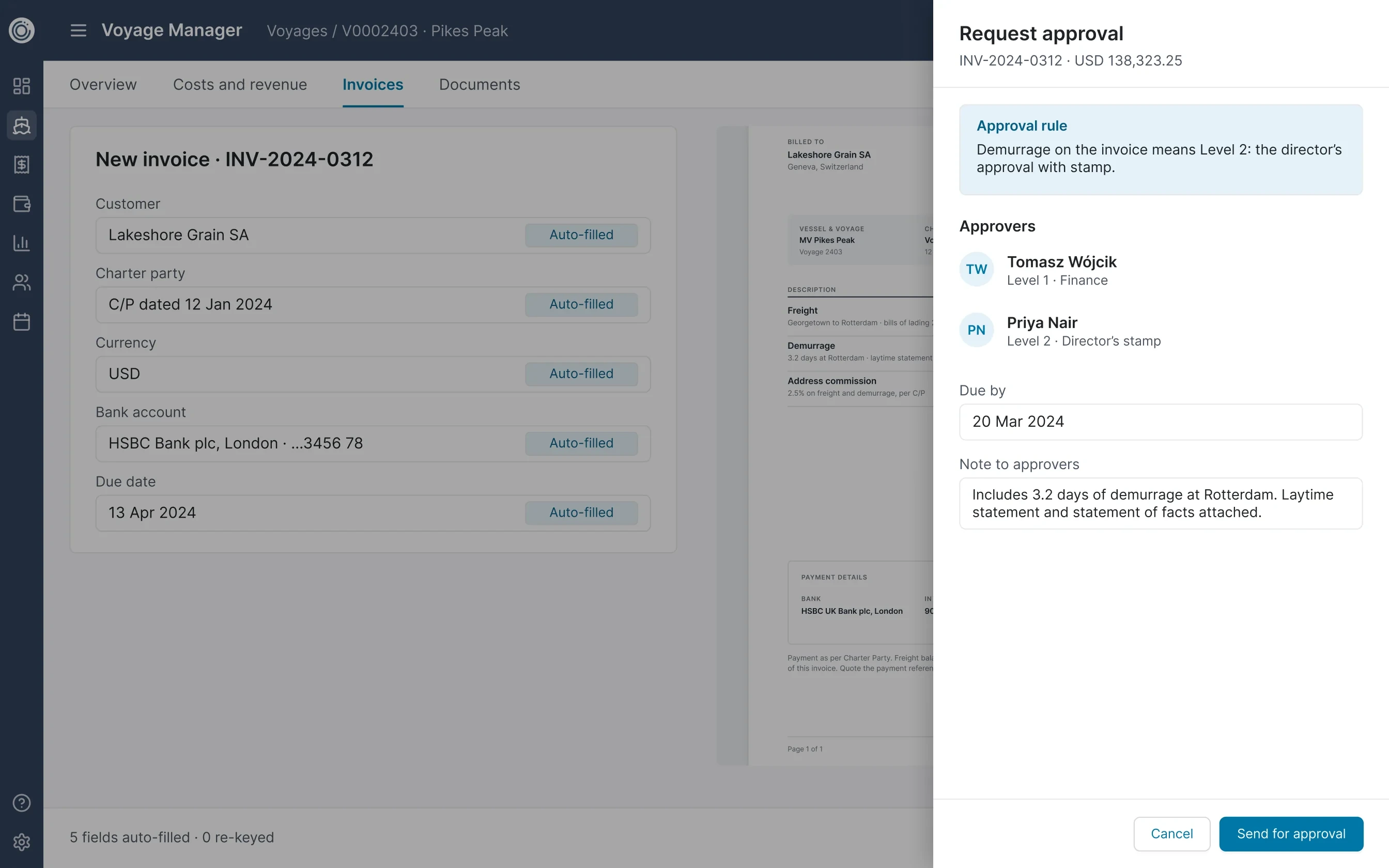
A new invoice with five auto-filled fields and the Request approval panel. The approval rule says demurrage on the invoice means Level 2: the director's approval with stamp. Approvers: Level 1 Finance and Level 2 Director's stamp.
The approval rule picks the approver. Demurrage sends the invoice to the director for a stamp.

$500M invoiced in five months, with every invoice out on time

In its first five months, the product invoiced $500M and sent 100% on time. The old and new systems ran side by side before switch-over. Every invoice matched. My design passed five sign-off stages, up to the C-suite on both sides. Two business units use the one product. Three other teams adopted the document pattern.

The design call that mattered most was one nobody asked for

Users asked to check each invoice before it left. Nobody asked for a preview. I designed one anyway, and users enjoyed it. The MVP came before research, so testing decided what changed. Now I decide with data, and I decide fast.

Scope
  • Payment status & tracking, invoicing & approvals, document workflows
  • The PDF preview, Progress and Notes, and the invoice list
  • The three-tier permission model and approval flow
Method
  • Heuristic reviews, heat maps, a competitor review and jobs to be done with finance experts
  • Interviews and A/B tests with 32 users